
Parmabet App: Android APK and iOS Guide
Whether to use the mobile browser, the Android APK or an iPhone home-screen shortcut, how to install each one, and what to keep in mind when playing on a phone.
18+ · Play responsibly
Parmabet Mobile App Overview
The mobile version brings every section of the desktop site to a phone layout: the sportsbook, live betting, the casino lobby, live tables, promotions and the cashier. No separate account is needed — the same login shows the same balance and history on any device. A bottom menu bar puts the most-used sections one tap away, and the bet slip, balance and menu buttons are placed within reach of one thumb.
There are three ways to play on a phone: directly in the mobile browser, with the Android APK, or through a home-screen shortcut (PWA) added in Safari on iPhone. The Parmabet apk is not listed on Google Play; app stores restrict real-money gambling apps in many countries, so the installer is distributed from the site itself. That is why the file should only ever be taken from the official Parmabet download link.
An app-like icon is practical for regular players: tapping it is faster than typing an address or searching, and it reduces the risk of landing on a fake page.
Mobile Browser vs Native App
The mobile browser is the simplest way in. Any up-to-date browser — Chrome, Safari, Samsung Internet or Firefox — is enough, and logging out leaves no account files on the device. That makes it the right choice on a borrowed phone or for occasional visits. The downside is that the address has to be opened each time and tabs are easy to lose.
A PWA (Progressive Web App) adds the site to the home screen like an app. Tapping the icon opens the site full-screen without the browser bar. On iPhone, what most people mean by an app is this shortcut. It takes almost no storage and stays up to date automatically. For a Parmabet mobile casino session on Android, the APK offers a similar full-screen experience plus optional notifications.
| Feature | Mobile browser | PWA shortcut | Android APK |
|---|---|---|---|
| Installation | None | Add to home screen | Download and install |
| Storage | None | Minimal | Size of the app |
| Updates | Automatic | Automatic | Install new version |
| Full screen | No | Yes | Yes |
| Notifications | Limited | Device-dependent | Can be supported |
Whether to install the Parmabet app or stay in the browser depends on habits. Occasional players are fine with the browser; daily players usually prefer the PWA or the APK. Whatever the choice, the login asks for the same details and the same safety rules apply. Older phones benefit from an updated browser and operating system: outdated browsers may fail to load live streams or payment windows properly.
Installing the Android APK
On Android, the app is installed from the download link on the mobile site. The download link usually sits in the mobile menu or near the bottom of the page. After the file is downloaded, the app that opens it — usually the browser — needs permission to install apps from unknown sources.
- 01
Open the download link
Visit the site in the mobile browser and tap the app or download item in the menu.
- 02
Download the file
Confirm the APK download; if the browser shows a warning, check that the file comes from the official Parmabet download page.
- 03
Allow installation
In Settings > Security, allow the browser to install unknown apps.
- 04
Install
Open the file from the Downloads folder and tap Install.
- 05
Log in
Open the app and sign in with your existing username and password.
- 06
Revoke the permission
After installation, switch the unknown-sources permission off again.
After installation the app opens on the login screen; there is no separate app account. If fingerprint or face login is offered, it should only be enabled on a personal phone.
For safety, the Parmabet apk must only be downloaded from the site’s own domain, never from file-sharing sites or links in messaging groups. Modified installers can be used to steal account details. If the phone’s built-in security scan flags the file, it should not be installed. When a new version is released, it is installed over the old one from the same official link.
Adding to iOS via PWA
iPhones cannot install apps from outside the App Store, so the app-like experience comes from Safari’s “Add to Home Screen” feature. It needs no download and takes a few seconds.
With the site open in Safari, tap the Share icon in the bottom bar, choose “Add to Home Screen” in the list and confirm the name. The icon then appears on the home screen.
Tapping the icon opens the site full-screen without the browser bar. To remove it, long-press the icon and choose “Remove App”.
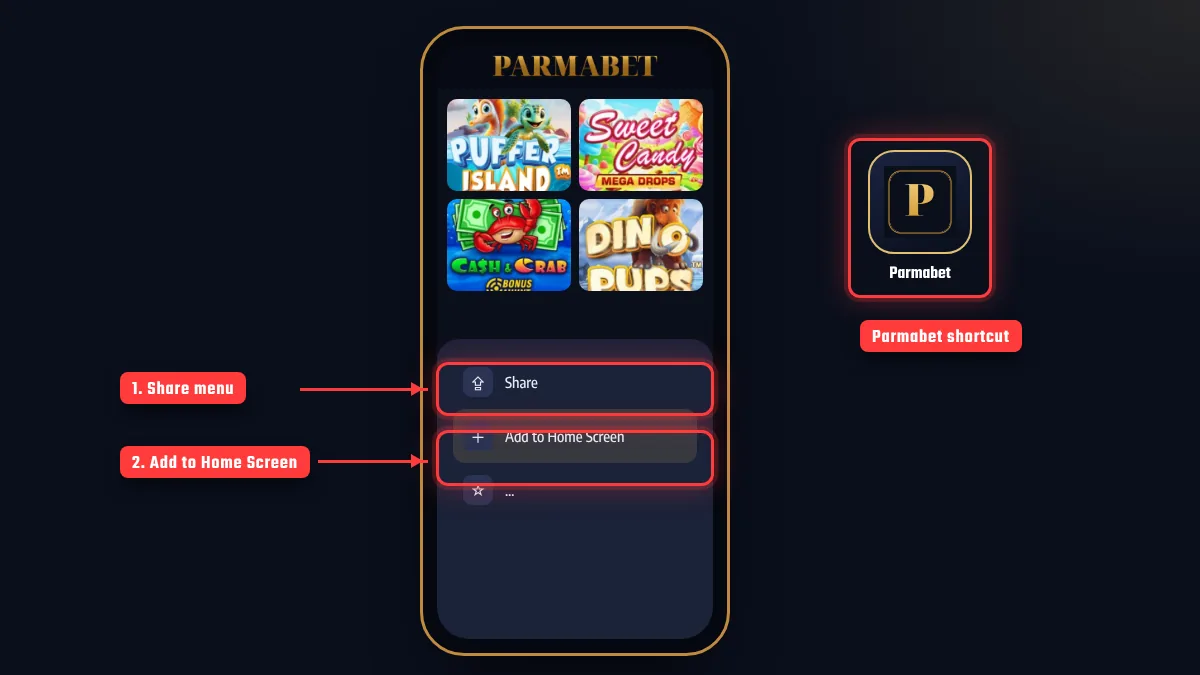
The shortcut can only be added from Safari; in other browsers the option may be named differently or be missing. After adding the Parmabet app shortcut, sign in once and tick “Remember me” on a personal device to stay logged in. The icon can be renamed or moved into a folder, and iOS Screen Time can set a daily limit for it — a handy way to keep playing time under control.
Mobile Casino UX
On a phone, the sportsbook uses scrollable league lists and large touch targets. In live betting, the score, stats and odds share one screen, and the bet slip warns when odds change. A good mobile habit is to wait for the “Bet accepted” confirmation, because a dropped connection can stop a slip from being sent. One-tap betting, where available, sends a bet without a confirmation screen; new players are better off keeping it switched off.
The Parmabet mobile casino lobby works in portrait and landscape modes: most slots play well upright, while live tables are easier to follow in landscape. On mobile data, live stream quality drops automatically when the connection weakens. Games load from the same providers with the same rules as on desktop, so a session started on a laptop can continue on the phone.
Data use depends on what is played:
| Activity | Relative data use | Tip |
|---|---|---|
| Sportsbook and bet slip | Low | Mobile data is enough |
| Slots | Medium at first load, then low | Load new games on Wi-Fi |
| Live casino | High | Use Wi-Fi or an unlimited plan |
| Live match streaming | High | Lower the video quality |
The table only compares activity types; real usage depends on stream quality and session length. If the app slows down, clearing the cache, reinstalling the latest APK from the Parmabet download page, or removing and re-adding the PWA shortcut usually helps. Live streams and graphics-heavy slots drain the battery quickly, so lowering screen brightness and closing background apps extends a session.
Safe Mobile Payments
The mobile cashier offers the same methods as desktop; only the layout changes. When paying with an e-wallet or banking app, the phone may switch to that app and return to the site afterwards. If the screen locks or the app is closed during payment, check the transaction history before paying again — otherwise the same amount can be sent twice.
Public or unknown Wi-Fi networks should be avoided for cashier operations; mobile data or a home network is safer. For crypto, copying the wallet address with copy-paste is far safer than typing it on a phone keyboard. Verification can also be completed from the phone: photograph the ID in good light, without glare and with all four corners visible, and upload it in the account menu. Methods, limits and payout times are covered in the payments guide.
Easy access on a phone also makes time control more important. Session reminders and time-out tools from the responsible gaming page work in the mobile version too.
FAQ
Is the Parmabet apk on Google Play?
No. The APK should only be downloaded from the site’s own link; installing outside the store needs a temporary permission on the phone.
Is there an iPhone app?
On iPhone, Safari’s “Add to Home Screen” creates an app-like shortcut. No file download is needed.
Are mobile and desktop accounts separate?
No. The same username and password open the same account and balance on every device.
Is the download link safe?
A link on the site’s own domain is the official source. Files shared in messaging groups or on other websites should not be used.
How do I update the app?
The PWA and the browser update automatically. For the APK, install the new version from the same link over the old one.
Can I use bonuses on mobile?
Yes. Promotions apply on mobile with the same terms and are selected in the cashier or the Promotions section.
The information on this page is current as of November 10, 2026. App versions, installation steps and supported devices may change; current details are on the mobile site. The same responsible gaming rules apply in the Parmabet mobile casino as on desktop, and under-18s are not allowed to play.

Zeynep Şahin is an editor who covers online casinos and sports betting. He explains promotion terms, payment steps and game rules in plain language and keeps market regulation and player protection in view in every text. On this site he checks every page against the cashier screens, promotion cards and general terms, and updates the page date whenever a detail changes.